
10. Dynamic Control and Setpoint Changes#
Time-domain simulations typically use fixed parameters throughout the simulation period. However, many advanced applications require changing control setpoints during simulation, such as implementing economic dispatch schedules, testing automatic generation control (AGC), or integrating with reinforcement learning algorithms. ANDES supports this through its multi-stage simulation capability.
The key insight is that ss.TDS.run() can be called multiple times, each time advancing the simulation from the current state to a new end time. Between calls, you can modify setpoints, reference values, or other parameters, and the simulation will continue from exactly where it left off.
This tutorial demonstrates how to change generator power setpoints during simulation and observe the dynamic response.
Note
Prerequisites: Complete Time-Domain Simulation for time-domain simulation basics and Data and File Formats for parameter modification techniques.
10.1. Setup#
%matplotlib inline

import andes

andes.config_logger(stream_level=20)
10.2. Initialize the System#
First, we load the system and run power flow to establish the initial operating point. We also disable any pre-existing disturbances (like the Toggle in the Kundur test case) so we can observe only the effects of our setpoint changes.
kundur = andes.get_case('kundur/kundur_full.xlsx')
ss = andes.run(kundur)
Working directory: "/home/docs/checkouts/readthedocs.org/user_builds/andes/checkouts/stable/docs/source/tutorials"
> Loaded generated Python code in "/home/docs/.andes/pycode".
Parsing input file "/home/docs/checkouts/readthedocs.org/user_builds/andes/envs/stable/lib/python3.11/site-packages/andes/cases/kundur/kundur_full.xlsx"...
Input file parsed in 0.0306 seconds.
Connectivity check completed in 0.0001 seconds.
-> System connectivity check results:
  No islanded bus detected.
  System is interconnected.
  Each island has a slack bus correctly defined and enabled.
System internal structure set up in 0.0200 seconds.

-> Power flow calculation
           Numba: Off
   Sparse solver: KLU
 Solution method: NR method
Power flow initialized in 0.0031 seconds.
0: |F(x)| = 14.9282832
1: |F(x)| = 3.608627841
2: |F(x)| = 0.1701107882
3: |F(x)| = 0.002038626956
4: |F(x)| = 3.745103977e-07
Converged in 5 iterations in 0.0025 seconds.
Report saved to "kundur_full_out.txt" in 0.0008 seconds.
-> Single process finished in 0.6020 seconds.
# Disable the pre-existing Toggle to have a clean experiment
ss.Toggle.set_status(1, 0)
10.3. Understanding Turbine Governor Setpoints#
ANDES provides a group-level setpoint API that automatically resolves the controller chain. For example, ss.SynGen.set_paux() locates the turbine governor connected to a given generator and writes to its auxiliary power input. The user does not need to know which governor model is in use.
Under the hood, the TGOV1 turbine governor model contains a power reference input pref0 and an auxiliary power input paux0. The following code examines the TGOV1 model structure to illustrate where these setpoints enter the equations.
# View the TGOV1 algebraic equations to see how pref0 and paux0 are used
print("TGOV1 Algebraic Equations:")
for var_name in ['pref', 'paux', 'pd']:
    var = getattr(ss.TGOV1, var_name)
    print(f"  {var_name}: {var.e_str}")
TGOV1 Algebraic Equations:
  pref: pref0 * R - pref
  paux: paux0 - paux
  pd: ue*(- wd + pref + paux) * gain - pd
The equation pref0 - pref = 0 indicates that the algebraic variable pref tracks the parameter pref0, which serves as the base power reference. Similarly, paux0 - paux = 0 tracks the auxiliary power input paux0. Both pref and paux feed into the pd equation, ultimately affecting the turbine mechanical power output.
The group-level API set_paux() writes to paux0, while set_pref() writes to pref0. Both methods resolve the controller chain automatically.
The initial values of paux0 for all generators are shown below.
print(f"Initial paux0 values: {ss.TGOV1.paux0.v}")
Initial paux0 values: [0. 0. 0. 0.]
10.4. Stage 1: Run Simulation to Steady State#
We first run the simulation for one second with no setpoint changes. This establishes a baseline and confirms the system is in steady state before we apply any changes.
# Set the first stopping time
ss.TDS.config.tf = 1
ss.TDS.run()
DAE compaction: removed 5 algebraic variable slots (m: 149 -> 144)
Initialization for dynamics completed in 0.0166 seconds.
Initialization was successful.
Simulation to t=1.00 sec completed in 0.0316 seconds.
Outputs to "kundur_full_out.lst" and "kundur_full_out.npz".
Outputs written in 0.0017 seconds.
True
10.4.1. Finding a Generator by Bus Number#
A common task is "change the voltage setpoint of the generator at bus 2" — but you only know the bus number, not the generator index. The find_connected() method bridges this gap by returning all devices that reference a given bus or device.
Combined with the setpoint API, this eliminates the need to manually trace through PV → StaticGen → GENROU → exciter → VREF0.
# Step 1: Find what's connected to bus 2
connected = ss.find_connected('Bus', 2)
print("Devices at bus 2:")
for model, idxes in connected.items():
    print(f"  {model}: {idxes}")

# Step 2: Get the generator idx from the result
gen_at_bus2 = connected['GENROU'][0]
print(f"\nGenerator at bus 2: {gen_at_bus2}")

# Step 3: Read and change the voltage setpoint
original_vref = ss.SynGen.get_vref(ss, gen_at_bus2)
print(f"Current vref: {original_vref:.4f}")

ss.SynGen.set_vref(ss, gen_at_bus2, 1.05)
print(f"Updated vref: {ss.SynGen.get_vref(ss, gen_at_bus2):.4f}")

# Restore for the rest of this tutorial (which demonstrates set_paux)
ss.SynGen.set_vref(ss, gen_at_bus2, original_vref)
Devices at bus 2:
  PV: [2]
  Line: ['Line_12']
  GENROU: [2]

Generator at bus 2: 2
Current vref: 1.1010
Updated vref: 1.0500
10.5. Stage 2: Apply Setpoint Change#
The auxiliary power setpoint of the first generator is increased by 0.05 pu. This change simulates a dispatch command instructing the generator to increase its output.
The recommended approach is the group-level setpoint API, which resolves the controller chain automatically. The generator index is specified, and the API locates the connected governor internally.
# Get the first generator's idx
gen_idx = ss.GENROU.idx.v[0]

# Increase the auxiliary power by 0.05 pu (system base)
ss.SynGen.set_paux(ss, gen_idx, 0.05)

print(f"Updated paux: {ss.SynGen.get_paux(ss, gen_idx)}")
Updated paux: 0.05
# Continue simulation to 2 seconds
ss.TDS.config.tf = 2
ss.TDS.run()
Simulation to t=2.00 sec completed in 0.0638 seconds.
Outputs to "kundur_full_out.lst" and "kundur_full_out.npz".
Outputs written in 0.0035 seconds.
True
Let us plot the auxiliary power input to see the step change.
fig, ax = ss.TDS.plt.plot(ss.TGOV1.paux, ylabel='Auxiliary Power [pu]')
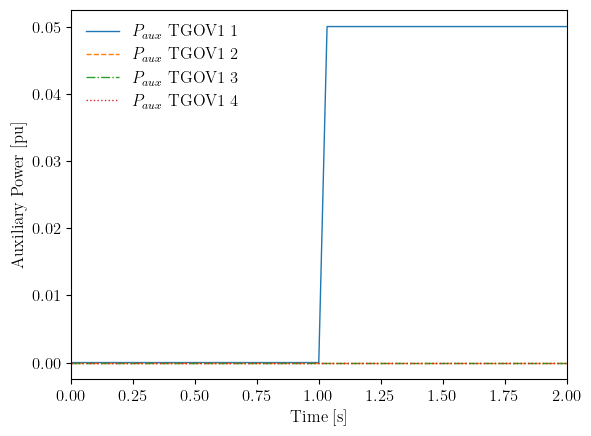
The plot shows that paux for the first generator stepped from 0 to 0.05 pu at t=1 second. This change propagates through the turbine governor dynamics to affect the mechanical power output.
fig, ax = ss.TDS.plt.plot(ss.TGOV1.pout, ylabel='Turbine Output Power [pu]')

The turbine output power increases for the first generator (blue curve) following the setpoint change. The response is not instantaneous because the turbine governor has dynamics (lag and lead-lag blocks) that smooth the response.
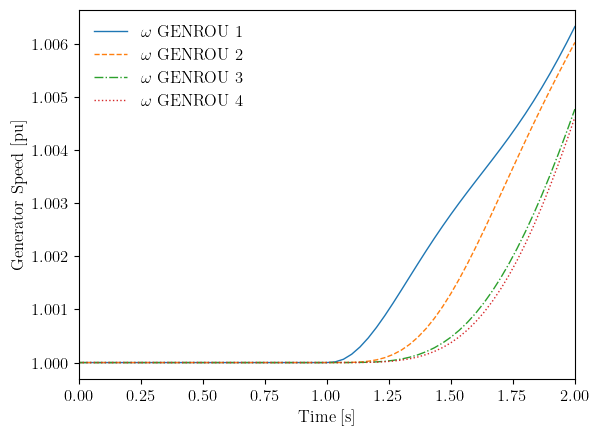
The generator speeds also respond to this power imbalance.
fig, ax = ss.TDS.plt.plot(ss.GENROU.omega, ylabel='Generator Speed [pu]')
10.6. Stage 3: Restore Setpoint#
The auxiliary power is reset to zero, and the system is observed returning to its original operating point. This demonstrates that the simulation correctly tracks multiple setpoint changes.
# Reset the auxiliary power
ss.SynGen.set_paux(ss, gen_idx, 0.0)

# Continue simulation to 10 seconds
ss.TDS.config.tf = 10
ss.TDS.run()
Simulation to t=10.00 sec completed in 0.4967 seconds.
Outputs to "kundur_full_out.lst" and "kundur_full_out.npz".
Outputs written in 0.0139 seconds.
True
fig, ax = ss.TDS.plt.plot(ss.TGOV1.paux, ylabel='Auxiliary Power [pu]')
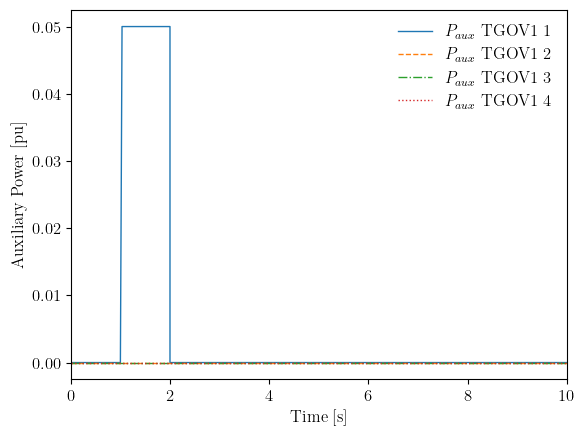
The auxiliary power shows two transitions: up at t=1s and back down at t=2s. The generator speeds show the corresponding dynamics as the system adjusts to each change.
fig, ax = ss.TDS.plt.plot(ss.GENROU.omega, ylabel='Generator Speed [pu]')

10.7. Applications#
The multi-stage simulation capability enables several advanced applications. The group-level setpoint API (set_pref, set_vref, set_paux, set_qref) is recommended because it resolves the controller chain automatically.
Application |
Recommended API |
Description |
|---|---|---|
Economic dispatch |
|
Follow dispatch schedules |
AGC simulation |
|
Frequency regulation signals |
Voltage control |
|
Voltage setpoint tracking |
Renewable dispatch |
|
P and Q reference changes |
Reinforcement learning |
|
Generic setpoint interface |
The key technique is the same in all cases: the simulation is run to a checkpoint, the relevant setpoint is modified through the API, and the simulation is continued.
Note
Advanced usage. For bulk operations or model-specific parameters not covered by the setpoint API (e.g., modifying all governor paux0 values simultaneously), direct in-place array assignment remains available:
ss.TGOV1.paux0.v[:] = new_values # in-place update of the entire array
When modifying arrays directly, in-place assignment (e.g., array[0] = value or array[:] = values) must be used rather than replacing the array reference. Replacing the reference (e.g., array = new_array) disconnects the variable from the simulation.
10.8. Cleanup#
!andes misc -C
"/home/docs/checkouts/readthedocs.org/user_builds/andes/checkouts/stable/docs/source/tutorials/kundur_full_out.txt" removed.
"/home/docs/checkouts/readthedocs.org/user_builds/andes/checkouts/stable/docs/source/tutorials/kundur_full_out.lst" removed.
"/home/docs/checkouts/readthedocs.org/user_builds/andes/checkouts/stable/docs/source/tutorials/kundur_full_out.npz" removed.
10.9. Next Steps#
Frequency Response and Load Shedding - Frequency response analysis
Eigenvalue Analysis - Small-signal stability analysis
Parameter Sweeps and Batch Processing - Batch simulation techniques